
Free online tool
CCTV Storage & Bitrate Calculator
Plan camera bandwidth, network uplink, NVR hard-disk storage and how many HDDs and NVRs a project needs, in minutes. Works for H.264, H.265 and H.265+/Smart codecs.
- Multiple camera groups
- Mixed codecs & frame rates
- Decimal TB, like HDD labels
Calculator
Add one row per camera group. Results update as you type. Leave the override blank to use the suggested bitrate.
Project settings
Camera groups
| Group / location | Qty | Resolution | Codec | FPS | Scene activity | Recording | Motion % | Hours / day | Override (kbps) | Bitrate (kbps) | Mbps | TB | Remove |
|---|
Estimates only. All figures are planning estimates based on typical industry values. Actual bitrate depends on camera model, scene, lighting, lens, encoder settings and firmware. Always check final designs against the camera and NVR maker's own calculator and datasheets before quoting or buying. The example project is fictional.
How the numbers are calculated
- Base bitrate: H.264 at 25 fps, medium activity: 2MP 4,096 · 3MP 5,120 · 4MP 6,144 · 5MP 7,168 · 6MP 8,192 · 8MP 12,288 · 12MP 16,384 kbps.
- Codec factor: H.264 100%, H.265 58%, H.265+/Smart 38% of H.264.
- Frame-rate factor: 0.4 + 0.6 × (FPS ÷ 25). Compression doesn't scale linearly, so low FPS keeps a floor.
- Scene activity: Low ×0.7, Medium ×1.0, High ×1.4.
- Bandwidth is shown at full bitrate (peak ingest), even for motion recording. Uplink = bandwidth × headroom.
- Storage GB/day = kbps × qty × 3,600 × hours × motion % ÷ 8 ÷ 1,000,000. 1 TB = 1,000 GB. Overhead % is added for RAID, formatting and a safety margin.
- HDDs = storage incl. overhead ÷ HDD size, rounded up. NVRs = cameras ÷ channels, rounded up. Check each NVR's drive bays and maximum incoming bandwidth too.
Excel template
Need it for a proposal? Get the full Excel version.
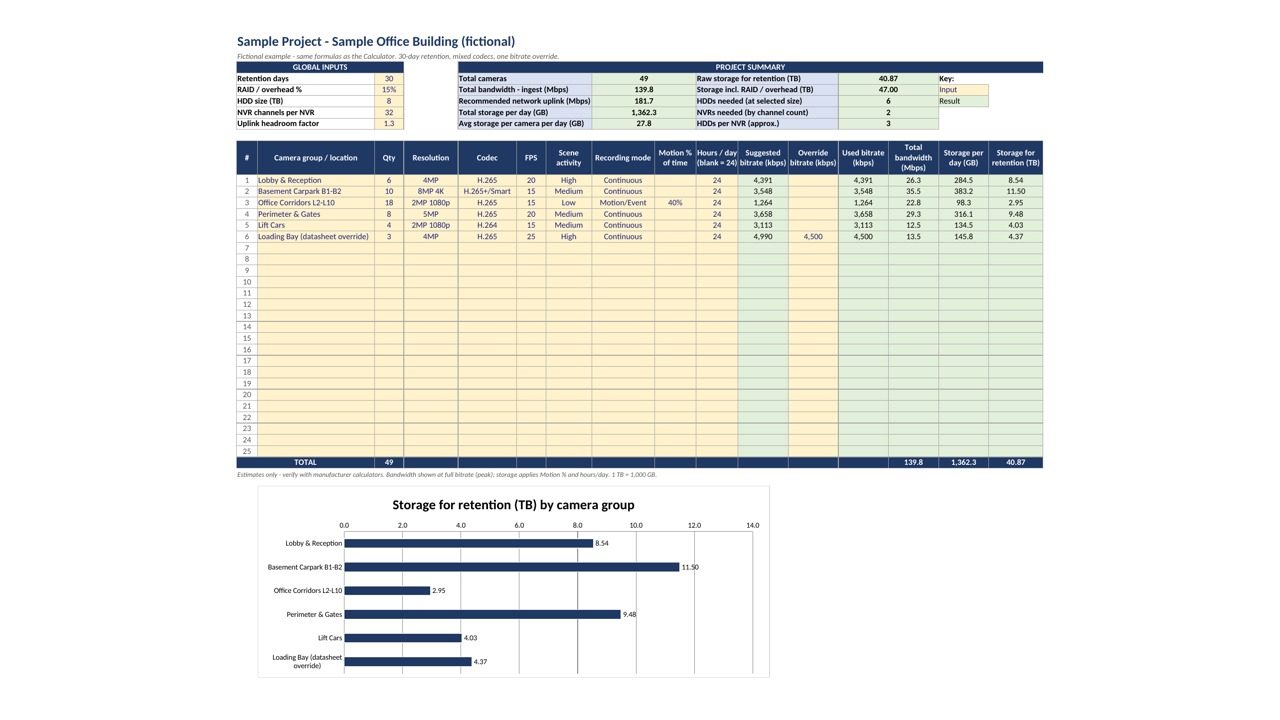
The downloadable template uses the same method as this page, and adds what you need to put a design in front of a client or a boss:
- Charts: storage by camera group, ready to paste into a report.
- Editable bitrate table: tune base bitrates, codec factors, FPS scaling and activity multipliers to your preferred camera brand.
- Printable output: print-ready, landscape pages for submissions and site files.
- Works offline: no internet or login needed. Excel 2010+, Google Sheets and LibreOffice. No macros.
- 25 camera groups, a worked sample project and step-by-step instructions.
Secure checkout and instant download via Gumroad.
FAQ
What bitrate should I use for CCTV at 20 fps?
Typical planning ranges for a medium-activity scene at 20 fps:
| Resolution | H.264 | H.265 |
|---|---|---|
| 2MP (1080p) | 3–4 Mbps | 1.5–2.5 Mbps |
| 4MP | 4–6 Mbps | 2.5–4 Mbps |
| 5MP | 5–7 Mbps | 3–4.5 Mbps |
| 8MP (4K) | 8–12 Mbps | 5–8 Mbps |
Busy scenes (roads, crowds, foliage, rain, night IR) can need 25–50% more. H.265+ or "smart" codecs can save a further 30–50%. These are estimates only; check your camera maker's figures.
Why is bandwidth shown at full bitrate for motion recording?
Cameras still stream at full bitrate when there's motion, so the network and NVR have to handle the peak. Motion % only reduces the storage figure.
Why does my 8 TB drive show less space in Windows?
Drive makers use decimal units (1 TB = 1,000 GB), which this calculator also uses. Operating systems often show binary units, so an 8 TB drive appears as about 7.3 "TB". The overhead % covers this and other formatting losses.
How much overhead should I add for RAID?
10–15% suits single-disk (JBOD) setups. For RAID 5 you lose one drive's capacity to parity, and for RAID 6 two drives, so increase the overhead or add those drives to the HDD count.
Is my data saved or tracked?
No. The calculator runs entirely in your browser. Nothing you type is sent anywhere, and this site uses no analytics or tracking cookies.
What do I get with the Excel template?
A single .xlsx file with Instructions, Calculator, Bitrate Table and Sample Project sheets. It adds charts, an editable bitrate table and printable output, and works offline. Get it on Gumroad.